Produce Weekly Content with AI Avatar Time-Saving Video Solutions
It can be a time-consuming and creative drain to produce videos every week. Marketing teams can get bogged down with repeated scripting, recording, editing, and publishing. Pippit streamlines these processes all in one creative workflow. Its tools can be used to create presenter videos efficiently and generally for marketing purposes. A system of structure in a week also helps to better predict production. This guide will help you to create an efficient workflow using Pippit.
Table of Contents
ToggleWhy Weekly Video Production Can Become Time-Consuming
Weekly video production is repetitive work that takes valuable time out of your day. Research, writing, recording, editing, captioning, visuals, review, and publication may be required for each topic. Lighting, equipment, backgrounds, preparation, and multiple takes are required for presenter recording. The more people who have varying responsibilities, the more difficult it will be to schedule. Another difficulty is the platforms, as their requirements and audience expectations differ. The same process repeated weekly can result in a loss of creative efficiency. For repeatable content, there are reusable digital presenter workflows. Pippit helps to streamline these activities and maintain a manageable weekly publishing schedule.
Plan a Repeatable Weekly Avatar Content System
The repeatable system begins with the weekly topics related to the clear communication objectives. Each Topic should answer a specific question, need, or marketing goal of your target audience. Limit scripts to a main message and supporting points. Organise topics into groups to make it easier for the presenter, voice, background, and visuals. This allows presenter choices to be reused with an AI avatar workflow. Pippit offers pre-designed presenters for various industries and communication styles. Develop periodic formats of tutorials, announcements, explainers, promotions, and educational updates. Maintain a consistent structure and have space for real-time topics and questions from the audience.
Save Production Time with Pippit’s Avatar Workflow
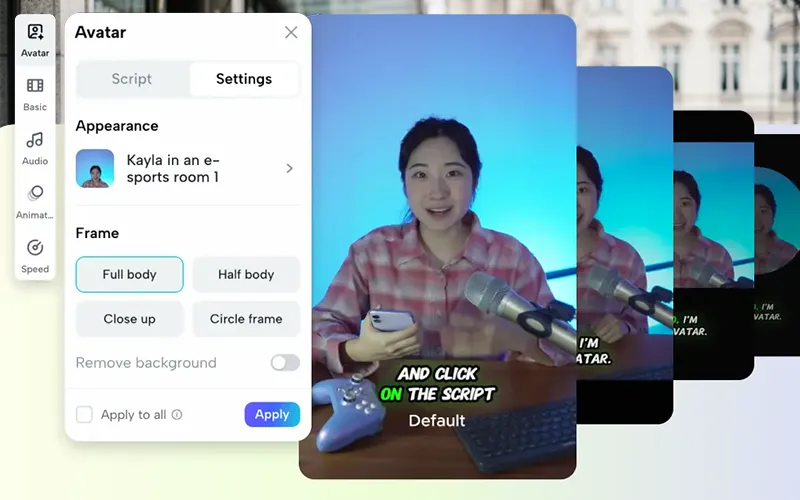
Pippit’s presenter workflow can cut down on repetitive setup for weekly videos. Use appropriate presenters without having to shoot new on-camera footage with varying looks, scenes, poses, and costumes. Tailor each script to the communication goal of the week. Voice and language options offer various content and audience needs. Pippit also offers caption styling and visual editing. A talking photo has the ability to bring a still image to life, and presenter videos can be more customizable. New videos can be created without repetition of the same scripts by using existing concepts. This allows for content repurposing to be feasible and keeps the videos meaningfully distinct.
Steps to Produce Weekly Content with AI Avatar Time-Saving Video Solutions
Step 1: Set Up Your Avatar for Faster Content Creation
- Sign up for Pippit using “Google”, “TikTok”, or “Facebook” account info.
- Open “More” from the left vertical menu bar. Then access “Video generator”.
- Find the “Popular tools” section and select “Avatar video” to view the available AI avatars.
- The feature helps you match voice narration with avatars easily. This makes it easier to produce dynamic and engaging weekly content.
Step 2: Create a Reusable Script and Caption Style
- Open the avatar tools and check the characters in the “Recommended avatars” section under “Choose avatar”.
- Filter the avatars by gender, age, industry, name, scene, pose, outfit style, or figure to quickly find a suitable option.
- Select your preferred avatar and click “Edit script” to customize each week’s dialogue.
- Enter text in multiple languages. The avatar can lip-sync the dialogue accurately.
- Scroll to “Change caption style” and choose a caption design that fits your content theme.
Step 3: Speed Up Editing and Publish Your Weekly Videos
- After applying lip-sync, click “Edit more” to refine the talking avatar video.
- Use the editor to adjust script timing, voice pacing, and facial expressions carefully.
- Add text overlays and background music to improve the final presentation without adding unnecessary production time.
- When your video is ready, click the “Export” tab in the top right corner.
- Select “Publish” to post on TikTok, Instagram, or Facebook. Alternatively, click “Download” and save the video with your preferred format, frame rate, resolution, quality, and name.
Weekly Content Types Suited to AI Avatar Videos
There are several common types of content that are good for presenter-led videos. Pippit can be used to organise each category with short scripts and uniform presentation styles.
- Educational tips: Create short learning clips from expertise that is repeated often with clear explanations.
- Product explainers: Give a structured narration of features, workflows, functions, or benefits.
- Social updates: Make weekly announcements short and present them using a presenter-hosted format.
- Marketing messages: Share campaign information and keep all videos within the same marketing theme.
- Tutorial series: Break down big processes into small lessons and explain them in sequential topics.
- FAQ content: Turn frequently asked questions into informational videos that can be repeated.
These are formats that will give you a good base to establish a consistent weekly publishing schedule. Different presentation standards are possible for each format, and they may use different scripts.
Repurpose One Idea into Multiple Video Assets
When planned strategically, a single core idea can be the basis for multiple video assets. Begin with the main idea, and then recognize various questions that can be asked about that idea. One script may clarify the idea, and another may provide examples of its use in practice. A variation that is a promotion can be limited to the relevant benefits without repeating the educational version. Different scripts can be used to convey more relevant information to different segments of the audience. Pippit allows for multilingual content creation, facilitating the adaptation of communication for a wider audience. Captions and framing can also be adapted to the various publishing contexts. This approach minimises unnecessary research and will provide more useful variations of a concept. But each variation should offer some value, rather than restate the same information. Thus, there is a need for a strong repurposing process that is both efficient and present with editorial distinctions.
Build Efficiency Without Sacrificing Content Quality
There’s no excuse for sacrificing accuracy, clarity, or audience relevance for speed in weekly publishing. Develop an “out-of-production” checklist of scripts, presenters, voices, captions, visuals, branding, and timing. Make sure to review all videos that have been created before they are published for factual or presentation problems. Review for pronunciation, pacing, caption accuracy, visual alignment, and message clarity. Maintain weekly themes to keep topics together and not random. A simple content calendar can help avoid repetition of topics and help with using the topics evenly. Pippit’s editing features can help with final adjustments; there’s no need to rebuild the production process. Quality checks also contribute to the uniformity of various campaigns and platforms. When production is fast and still useful and accurate, then it is valuable. The most effective workflow is a mix of structure, reusability, editing, and human review.
Conclusion
A weekly workflow can help to make recurring video production easier and quicker to manage. Pippit makes creation, editing, customising, and exporting into a streamlined creative process. Reusable presenters can help minimize repetitive recordings and enable uniform communication. Further improvements to efficiency can be gained by planning topics, preparing concise scripts, and recycling ideas. Careful reviews are still needed for accuracy and relevance and for professional presentation. A practical workflow will make weekly publishing more predictable without compromising the quality of the content.
Frequently Asked Questions
1. What is an AI avatar?
An AI avatar is a digital presenter that can speak a written script and create video content without traditional camera recording.
2. How can AI avatars save time in video production?
They can reduce the need for filming, repeated takes, and some manual editing, making weekly video creation faster.
3. What types of videos can you create with an AI avatar?
You can create tutorials, educational videos, product explainers, FAQs, announcements, and marketing videos.
4. Can AI avatars speak different languages?
Yes, many AI avatar tools support multiple languages and can create videos for different audiences.
5. Can I reuse an AI avatar for weekly content?
Yes. You can use the same presenter with different scripts, topics, captions, and visuals to maintain a consistent style.
6. Can AI avatar videos be used for social media?
Yes, AI avatar videos can be prepared for platforms such as TikTok, Instagram, and Facebook.
7. Can I add captions to AI avatar videos?
Yes, captions can be added and styled to make the video easier to understand and more suitable for social media.
8. How can I create weekly content with an AI avatar?
Plan your topics, prepare short scripts, select an avatar, customize the voice and captions, edit the video, review it, and then publish it.
Tags