



Your earbuds used to last from the morning train to the evening gym session. Then you moved to a new Android phone, and now the low-battery tone starts before the ride home is over. The earbuds are the same pair with the same charging habits, which leaves one question to answer: why do my earbuds die so fast all of a sudden?
In most cases, the battery itself is fine. Playtime depends on choices the new phone makes for you, starting with the Bluetooth codec it picks and how hard noise cancelling has to work, plus a handful of features that keep running in the background. The sections below explain each cause, the settings worth checking, and what a battery spec sheet leaves out.
Why Does the Same Pair Last Longer on One Phone Than Another?
Battery life comes from the pairing, not from the earbuds alone. Each time they connect, the phone and the earbuds agree on how audio will travel between them. That agreement covers the codec (the format used to compress sound and send it over Bluetooth), how much data goes through each second, and which extra features stay switched on. Swap the phone and the agreement can change.
iPhones keep this simple. They use AAC for nearly all Bluetooth listening, so a pair tends to behave the same way from one iPhone to the next. Android phones vary much more. Each phone maker decides which codecs to support, how quickly the phone raises or lowers the data rate, and which audio extras are on by default. A phone that defaults to a high-bitrate codec can run the same earbuds down faster than one that sticks with AAC. iPhones don’t support LDAC, so the LDAC steps in this article apply only to compatible Android phones.
How Do High-Quality Codecs Drain Earbud Batteries?
The more data a codec sends, the harder the chip inside each earbud works to decode it, and that work takes power. SBC, the basic codec nearly all Bluetooth headsets support, tops out at around 328 kbps. AAC usually runs at a similar or lower rate. LDAC, a codec built for higher-quality wireless audio, can carry up to 990 kbps at its top setting, about three times as much data as SBC.
Signal strength mostly affects sound quality rather than battery life. Many phones use adaptive bitrate, which lowers the data rate when the connection weakens, such as with the phone in a back pocket on a crowded train, and raises it again when the signal recovers. With LDAC, that means the higher setting you picked may not hold on a crowded train, so keeping the phone closer to the earbuds helps the connection stay steady.
Entry-level earbuds that stick to SBC and AAC avoid most of this extra load, since they don’t have to decode a high-bitrate stream. Earbuds with LDAC give you a choice instead. The soundcore Space A40 supports SBC, AAC, and LDAC, and LDAC stays off until you turn it on in the soundcore app under Settings, Sound Mode, then Preferred Audio Quality (LDAC). The switch takes about 10 seconds and works with phones that support LDAC on Android 8.0 or later.
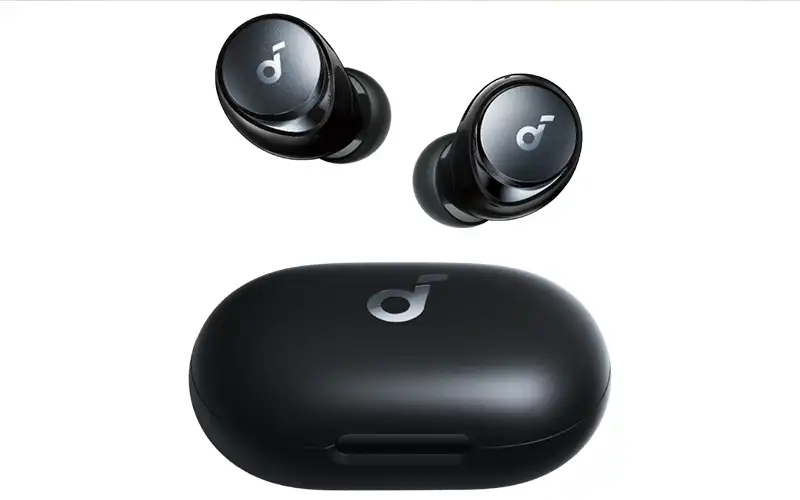
soundcore Space A40 wireless earbuds with a black charging case.
The Space A40’s playtime figures show what that choice costs. Based on internal lab testing, in normal mode at 50% volume, the earbuds run up to 10 hours per charge and 50 hours with the case. Noise cancelling mode brings a single charge to 8 hours. Turning on LDAC cuts it to 6 hours, and running LDAC with noise cancelling together leaves about 5 hours, or 25 hours with the case. LDAC also switches off multipoint connection while it is active, and the link can be less stable in some environments. A 10-minute charge gives the Space A40 about 4 hours of playback when you’re short on time. For most people, that points to a simple routine: keep LDAC for listening at a desk or at home, and switch back to AAC on long commuting days.
How Much Does Noise Cancelling Drain Your Battery?
Does noise cancelling drain battery? Yes, though how much depends on the earbuds. ANC (active noise cancellation) works by picking up outside sound through small microphones and playing an opposite signal to cancel it out. The microphones and the DSP (digital signal processor, the small chip that does this math) keep running for as long as ANC is on, including the quiet gaps between songs.
Adaptive ANC uses a little more power. It keeps checking the noise around you and the seal in your ear, then retunes the cancellation as things change, such as when you step off a quiet street onto a loud bus. Transparency mode has a cost as well, because it also uses the microphones and processors, this time to let outside sound in. Normal mode, with both features off, is the setting that uses the least power.
Which Android Settings Should You Check When Playtime Drops?
Start with the codec, then look at the features that run in the background. Menu names differ between phone makers, so the steps below use common setting names.
Most Android earbuds will happily run whatever codec the phone picks, so it’s worth opening Developer options to see what’s actually active. To turn on that menu, go to Settings, open About phone, and tap Build number seven times. Inside Developer options, the Bluetooth audio codec entry shows the codec in use. If LDAC is active, the LDAC playback quality entry lets you choose a lower setting or the adaptive option.
After the codec, these settings have the most effect on playtime:
- Spatial audio and head tracking process sound to create a surround effect and follow your head movement. Turning them off for podcasts and calls removes that extra work.
- Multipoint connection keeps the earbuds linked to two devices at once. If you only listen on your phone, you can switch it off.
- Voice wake-up keeps a microphone ready for a wake word. It makes sense to disable it if you rarely give voice commands.
- Wear detection pauses music when you take an earbud out, so leaving it on usually saves power by stopping playback nobody is hearing.
- Background permission for the earbud app matters because Android battery optimization can stop the companion app, and then you may miss firmware update prompts, even though updates can change how the earbuds manage power.
- Volume affects playtime too, since louder playback draws more power to drive the speakers.
Change one setting at a time and use the earbuds through a normal day before judging the result.
What Does a Battery Spec Sheet Leave Out?
Mostly the test conditions. Many long battery life earbuds quote their headline number with ANC off and volume at 50%, so the figure you’ll see in daily use is often lower. It also helps to separate the two numbers on the box. Per-charge playtime is how long you can listen before the earbuds go back in the case, while the with-case figure adds the recharges the case can provide. On a long commute, the per-charge number is the one that decides when the music stops.
Matching your settings to where you listen gets you closer to the rated figure:
| Where You Listen | Codec | Noise Cancelling | Why It Fits |
| Train or bus commute | AAC or SBC | On, adaptive if available | ANC earns its power cost in loud places, so the codec is where you save |
| Quiet office | AAC | Off or Normal mode | There is little noise to cancel, so ANC drains power without much benefit |
| Long flight | AAC | On | Cabin noise is loud for hours, and a lighter codec stretches each charge |
| Hi-res music at home | LDAC | Off | A charger is close by, and a quiet room needs little noise cancelling |
Conclusion
Shorter playtime after a phone upgrade mostly comes from the mix of codec, noise cancelling, and background features that the phone and earbuds settle on, and that mix is something you can adjust. Check which codec is active in Developer options after pairing. Use ANC where the noise is loud enough to justify it and turn it off in quiet rooms. Install firmware updates when the earbud app offers them. If playtime still falls well short after those changes, compare your listening conditions with the ones behind the spec sheet before deciding the battery has worn out.
Frequently Asked Questions
Is LDAC Bad for Earbud Battery Life?
It shortens playtime, but it doesn’t harm the battery. LDAC battery drain comes from the extra decoding work, so the earbuds simply run out sooner during each session. Using LDAC at home and AAC when you’re out lets you pick sound quality or playtime depending on where you are.
Why Does One Earbud Die Faster Than the Other?
One earbud often handles more of the work, such as managing the link to your phone or picking up your voice on calls, depending on the design. Dirty charging contacts can also stop one side from charging fully. Wipe the contacts in the case and on the earbud with a dry cloth, then fully charge both sides and test again.
Do Firmware Updates Improve Earbud Battery Life?
Sometimes. An update can change how the earbuds manage power or fix connection bugs that cause repeated reconnecting. Release notes don’t all mention battery changes, so install the update and compare a normal day of use afterward.
Why Does My Codec Setting Keep Changing Back?
Many Android phones treat the Developer options codec choice as temporary and reset it when the earbuds reconnect. The earbud app can also override it if it has its own audio quality setting. Check the active codec after each pairing, and set your preference in the earbud app when one is available.
How Can You Tell If an Earbud Battery Is Actually Worn Out?
Test the earbuds in the lightest setup: a full charge, ANC off, AAC or SBC, and moderate volume. If playtime still lands far below the rated figure, the battery has likely lost capacity over many charge cycles, which is normal for lithium-ion cells after long use.