


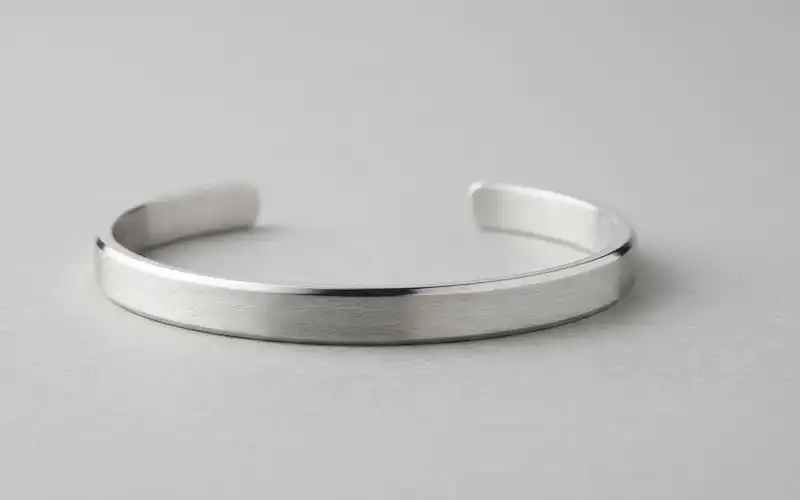
A brushed metal bracelet can look like a mirror-polished piece after an aggressive lighting correction. The darker areas become bright, the fine surface pattern fades and a soft reflection turns into a crisp highlight. The result may be more striking, yet it can set the wrong expectation about the finish a customer will receive.
When selecting an AI Photo Editor result for an accessories page, compare how the material is represented as well as how visible it becomes. The aim is to present the actual piece clearly. A brighter candidate should not win automatically when the feature being sold is a deliberately muted or textured surface.
Name the Finish Before Judging the Brightness
Begin with the actual product information and an adequate reference view. Establish whether the bracelet is intended to appear brushed, polished or treated in another way. Use the maker’s verified description where available, and inspect the real piece if the decision depends on a subtle visible characteristic. Do not identify a material solely from a generated highlight.
For a hypothetical listing, imagine a bracelet whose selling point is a fine directional texture. The original photograph is a little dark, but that texture remains visible. A useful correction would make the piece easier to examine while retaining the distinction between the patterned surface and the smoother edge. A uniformly glossy result would change the story of the object.
PicEditor AI offers a dedicated relighting route that takes an uploaded image and generates a relit candidate. That route is presented as an automatic lighting adjustment rather than a manual retouching panel. Use the candidate as an option to inspect, without assuming that the service can certify the surface finish or preserve every material detail exactly.
In an AI Photo Editor comparison, write down the characteristic that must survive. Photo editor AI can alter the appearance of a reflection while brightening a scene, so give the review a more precise target than improved lighting. The target might be that the broad face remains visibly textured and the edge still reads differently from that face.
Compare the Reflected Edges Across the Surface
Inspect how the light behaves around the bracelet’s shape. A smooth, sharp reflection crossing the broad face may suggest a different finish from a softened band broken by visible texture. The point is not to infer a complete material specification from a photograph. It is to notice when the edited candidate changes the impression created by an adequate source reference.
Look at the transition between the face and the edge. If relighting erases that transition, the object may appear flatter or differently constructed. If it adds an intense edge that the source does not support, the candidate may imply a bevel or polished border that the product does not have. These are reasons to return to the object, not reasons to invent a more elaborate product description.
Compare the source and candidate at a similar displayed size before enlarging details. Enlargement can help locate a surface patch, but the listing’s actual view determines what buyers can notice. An attractive close-up in the editor is not useful if the selected product image presents the bracelet so small that the finish becomes indistinguishable.
PicEditor AI alternatives may offer different visual treatments of the same source. Keep the selection focused on the finish under review. A candidate with a more dramatic background can distract from a less accurate surface, while a quieter image may describe the object better. Separate the background preference from the material decision rather than letting one compensate for the other.
Use a neutral surrounding view where practical when making the comparison. Strongly coloured props can cast or suggest tones that complicate the judgment. This is a presentation choice, not a claim that a neutral background makes a screen image colour-accurate. Reliable colour decisions may need a suitable photographic and viewing workflow beyond the generated candidate.
Reject Corrections That Invent a Different Surface
Suppose one candidate removes the directional marks entirely, while another exaggerates them into deep grooves. Both can be unsuitable even though they fail in opposite directions. The first loses the finish; the second adds apparent relief. Record the specific issue so that the next attempt does not simply trade one misleading appearance for another.
A workflow using photo editor AI may still be useful for improving an otherwise serviceable photograph, but some source images do not contain enough visible information for the intended decision. A dark blur cannot establish the missing surface detail. If the finish matters to the listing, a new photograph under more suitable lighting may be the better investment.
Retain an unedited reference separately from candidates. Once several glossy alternatives are on screen, the team may begin to prefer the treatment it has seen most often. Returning to the real object and the source helps keep the discussion anchored in the product. Preference for a style is a valid creative judgment, but it should not silently replace a factual description of the item.
Check the final image against the listing copy. If the text emphasizes a matte or brushed surface while the image looks highly reflective, the combination needs review. A detailed disclaimer buried elsewhere does not make the mismatch easier for the shopper to interpret. Choose a picture and description that can be understood together at the point of selection.
A useful review note identifies where the distinction was lost. For example, the central face may have become one flat white patch while the lower edge retained a readable reflection. That is more actionable than saying the whole image looks fake. The product owner can decide whether another photograph is needed, and the editor can avoid selecting a different candidate with the same unreadable patch.
For a collection containing several finishes, avoid making every piece appear identically glossy for visual consistency. Consistent framing and background can help the page feel coherent without removing the distinction the buyer needs. The treatment should leave room for the actual differences among the products.
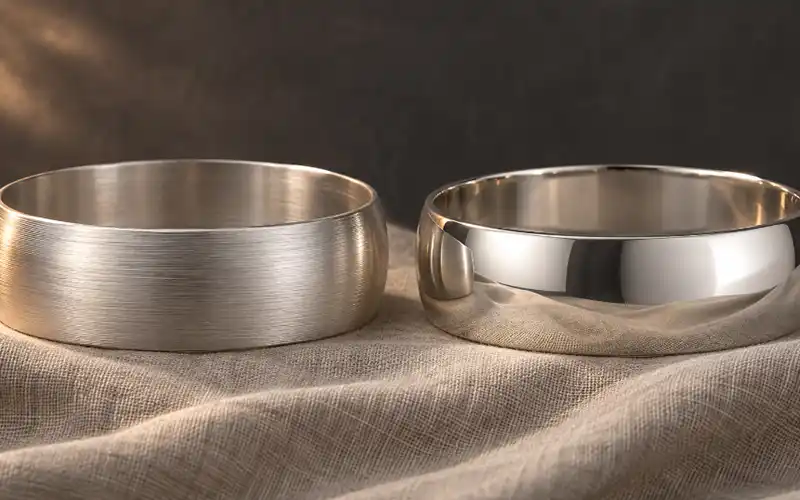
Comparing the original brushed-metal texture with an overly glossy AI-edited jewellery finish.
Choose the Image That Describes the Actual Piece
The approved candidate should make the bracelet visible while retaining the characteristic finish supported by the reference. If the team cannot agree whether that characteristic survives, seek a better source photograph or have the product owner review it. Obtain an adequate reference before selecting another generated candidate for the listing.
PicEditor AI can help explore a relit presentation, particularly when a source image is usable but visually subdued. Keep the option that clarifies the piece without making its surface look like another product. In the handoff, retain the chosen file and the note describing the finish that was checked.
A shopper does not see the rejected candidates or the team’s explanation. They see the selected image beside the product description. Review those together one last time, and prefer a slightly quieter photograph over a striking correction that promises the wrong surface.
Frequently Asked Questions
- How can an AI Photo Editor improve jewellery photos?
An AI Photo Editor can improve lighting, brighten dark areas, and make jewellery easier to see while maintaining its original appearance.
- What is the difference between brushed and polished metal finishes?
Brushed metal has a soft, textured surface with fine directional marks, while polished metal has a smooth, shiny surface that reflects light clearly.
- Can AI photo editing change the appearance of jewellery?
Yes. Strong lighting adjustments can remove surface textures, exaggerate reflections, or make brushed metal look polished.
- How can I preserve the original jewellery finish when editing photos?
Use a clear reference image, make moderate lighting adjustments, and compare the edited result with the original photograph.
- What should I check when comparing AI-edited jewellery photos?
Check the surface texture, reflected edges, brightness, metal finish, and small details to make sure the product still looks realistic.
- Is PicEditor AI useful for improving jewellery photography?
PicEditor AI offers an automatic relighting feature that can help improve the lighting of jewellery photos. However, the results should be checked for changes to the original surface details.
- Should I use a brighter image for my jewellery product listing?
Not always. Choose an image that clearly shows the jewellery while preserving its actual finish, texture, and reflections. A slightly darker but accurate image may be better than an overly bright edit.